Say it messy. Glas types it clean.

Hold the right Option key anywhere on your Mac and speak, in Bulgarian or English. Glas turns what you said into the text you meant: no ums, your corrections applied, written the way the app you are in expects.

Download for Mac

Version 0.5.0, 2.0 MB. macOS 26 or later on Apple Silicon. 14 days of Pro, no card.

Anywhere you type

Click into a chat in Messages, WhatsApp or Viber, an email or a document. Hold the right Option key, say it, let go: a second or two later the text is in the field, written the way that app expects. Casual in a chat, full sentences in Mail, a command in Terminal.

  • Bulgarian or English, whichever you speak
  • Fillers and false starts gone
  • Your corrections applied: "at three, no wait, at four"
  • Names spelled the way your screen and your dictionary spell them

Messages, WhatsApp, Viber, Telegram, Slack, Teams, Mail, Gmail, Notes, Word, Google Docs: every app on your Mac where you can type. See how it writes in each one

Edit by voice

Select some text, hold the right Command key and say what should change. Glas rewrites the selection in place. If it is not sure what you meant, your text stays exactly as it was.

  • Nothing selected? The same key just types what you say
  • Works in any app that lets you select text
  • Shorter, clearer, more polite, a list, another language
  • Nothing changes unless the rewrite is ready
  • "make this shorter"
  • "turn this into bullet points"
  • "more polite, it's for a client"
  • "преведи го на английски"

Notes that hear both sides

Start a note before a call. Your microphone becomes "Me" and the call becomes "Them", in Bulgarian and English on Pro and in English on Free. When you stop, Glas writes what was decided and who does what next.
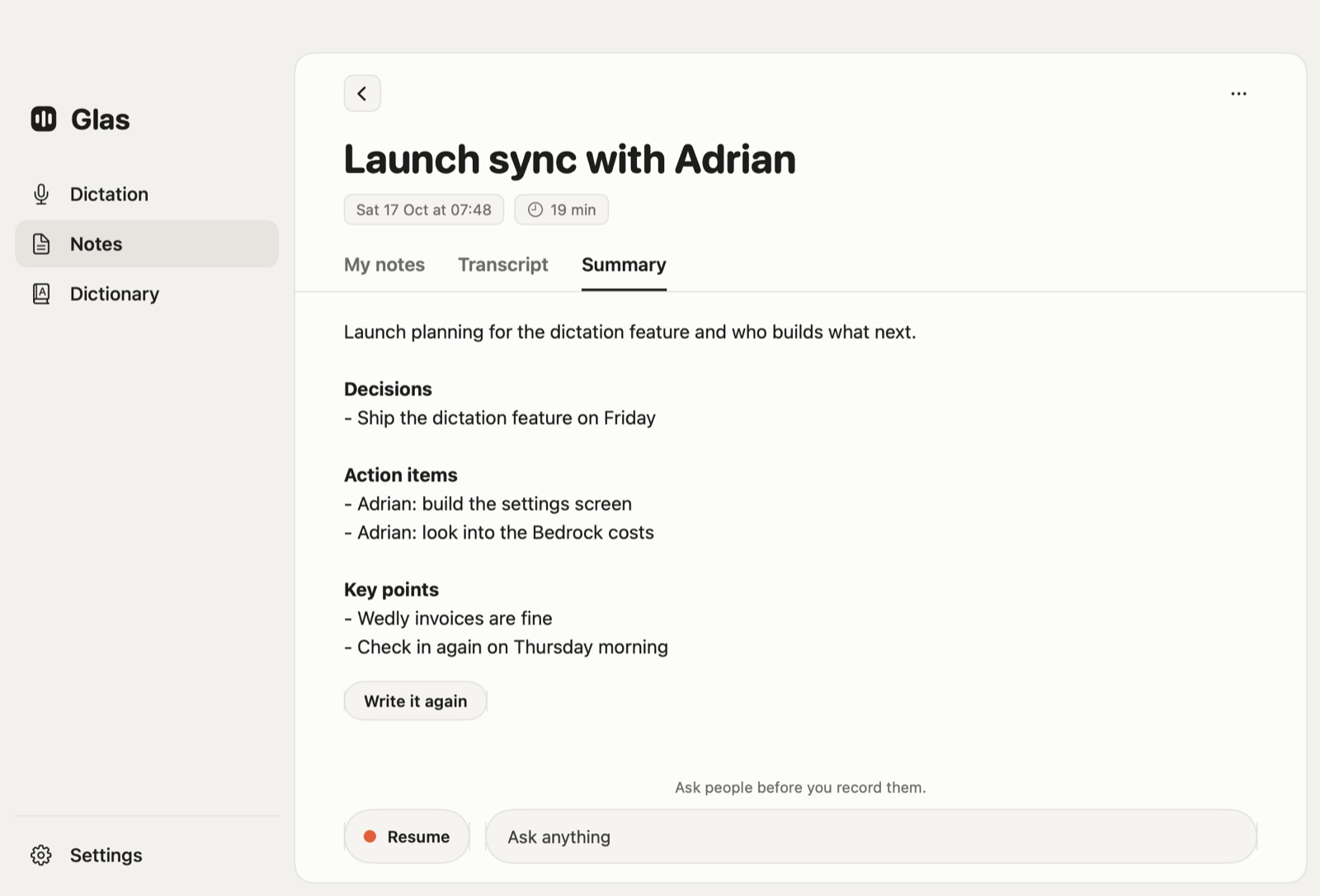
A Glas note with its summary: decisions, action items and key points

Pricing

Every new account starts with 14 days of Pro. No card, and it turns into Free by itself when the days are up.

Free

$0 no card, no time limit

  • English, recognized on your Mac
  • Cleaned up by Glas
  • 2,000 words a week
  • Meeting notes with a transcript

Pro

$12 a month, or $120 a year

  • Bulgarian and English
  • Edit by voice
  • Summaries and answers for your notes
  • 80,000 words a month, about nine hours of talking

Prices include tax. You upgrade inside Glas, from Settings.

Limits, the trial and billing in detail

Up and running in a minute

  1. Download

    Open the disk image and drag Glas onto Applications.

  2. Allow it once

    macOS asks once if you are sure you want to open it: click Open.

  3. Give it access

    Microphone and Accessibility, from the checklist Glas opens.

  4. Sign in

    Type your email and click the link Glas sends you. No password.

Download for Mac

Where your words go

  • On Pro, your voice goes to Glas and on to OpenAI, which turns it into text. On Free, your Mac does that, and only the words go out to be cleaned up.
  • Glas keeps neither the sound nor the words, only how many there were. OpenAI does not train on them.
  • Your history and notes stay on your Mac, in files only you can read.
  • In a password field, speech is recognized on the Mac and never leaves it.

Lost the connection? Glas keeps the recording, and Retry Last Dictation in the menu sends it again.

You need

  • macOS 26 or later on a Mac with Apple Silicon
  • An internet connection
  • An email address to sign in

Questions

Can I dictate in Bulgarian on a Mac?
Yes. On Glas Pro and during the trial, Glas hears Bulgarian and English, whichever you speak. The Free plan dictates English only.
How is Glas different from the dictation built into macOS?
Glas writes what you meant, not every sound you made: it drops fillers and false starts, applies corrections like "at three, no wait, at four", spells names the way your dictionary does and writes for the app you are in. You can also select text and change it by voice.
Is there a free trial?
Yes. Every new account gets 14 days of Pro with no card. When the days are up the account turns into Free by itself, and nothing is charged.
How much does Glas cost?
Free costs nothing and covers 2,000 English words a week. Pro is $12 a month or $120 a year, tax included, with 80,000 words a month.
Does Glas keep my voice or what I say?
No. On Pro your voice goes to Glas and on to OpenAI to become text; Glas keeps neither the sound nor the words, only how many there were, and OpenAI does not train on them. Your history and notes stay on your Mac.
What do I need to run Glas?
A Mac with Apple Silicon on macOS 26 or later, an internet connection and an email address to sign in.